UX Designer Portfolio for Beginners Complete Guide 2026
Complete step-by-step guide to create a professional UX designer portfolio from scratch. Learn portfolio structure, case study writing, and career preparation.
⚡ TL;DR
- Portfolio structure: Essential sections and content for a professional portfolio
- Case study format: Step-by-step guide to writing compelling case studies
- Common mistakes: What to avoid when building your first portfolio
- Project ideas: 4 beginner-friendly projects to showcase your skills
Why Your Portfolio Matters
Your portfolio is your most important tool as a UX designer. It's often the first thing hiring managers see, and it can make or break your chances of landing an interview. Here's why it matters:
First Impression
Recruiters spend an average of 6 seconds scanning your portfolio. Make every second count.
Skills Demonstration
Your portfolio shows your design process, not just the final results.
Differentiation
Stand out from other candidates by showcasing your unique approach and personality.
Career Growth
A strong portfolio opens doors to better opportunities and higher salaries.
The Portfolio Reality Check
of hiring managers reject portfolios within 30 seconds
of successful UX designers credit their portfolio for landing their job
more likely to get interviews with a strong portfolio
Portfolio Structure & Layout
A well-structured portfolio follows a logical flow that guides visitors through your work and story. Here's the proven structure that works for UX designers:
📌 See These Structure Examples
1Hero Section & Navigation
Your first impression matters. The hero section should immediately communicate who you are and what you do.
Essential Elements:
- Clear, professional headshot
- Compelling tagline (1-2 sentences)
- Primary CTA button
- Clean, intuitive navigation
- Contact information easily accessible
Pro Tips:
- Use your real name, not "UX Designer"
- Include your location if relevant
- Keep navigation simple (max 5 items)
- Make your CTA action-oriented
2About Page
This is where you tell your story and connect with potential employers on a personal level.
Must-Have Content:
- • Your journey into UX design
- • What drives your passion for design
- • Your design philosophy
- • Skills and tools you use
- • Fun facts or personal interests
Writing Tips:
- • Write in first person
- • Be authentic and genuine
- • Keep it conversational
- • Include a professional photo
- • Show personality without being unprofessional
3Project Showcase
This is the heart of your portfolio. Show 3-4 of your best projects that demonstrate different skills and approaches.
Project Selection:
- • Choose diverse project types
- • Show different industries or problems
- • Include both solo and team projects
- • Pick projects you're proud of
- • Ensure you can speak confidently about each
Presentation:
- • Lead with the most impressive project
- • Use high-quality project thumbnails
- • Include project duration and role
- • Add brief project descriptions
- • Make it easy to navigate between projects
4Contact & Footer
Make it easy for people to reach you. This section should be simple but comprehensive.
Contact Information:
- • Professional email address
- • LinkedIn profile
- • Phone number (optional)
- • Location (city, state/country)
- • Social media (if relevant)
Additional Elements:
- • Resume download link
- • Copyright notice
- • Last updated date
- • Back to top button
- • Simple, clean design
Case Study Structure
A well-structured case study tells a compelling story of your design process. Here's the proven format that works:
📚 Deep Dive Resource
For a comprehensive guide to structuring compelling case studies that hiring managers actually read, check out our detailed guide.
Case Study Structure Guide📖 Study These Case Studies
1Project Overview
Start with a brief summary of the project, the problem you were solving, and your role.
Example: "Redesigned the checkout flow for an e-commerce platform, reducing cart abandonment by 23% and increasing conversions by 15%."
What to Include:
- • Project title and duration
- • Your role and responsibilities
- • Team size and collaboration details
- • Key metrics or outcomes
- • Tools and technologies used
2Problem Statement
Clearly define the problem you were solving. Use data and user research to support your claims.
Example: "User research revealed that 67% of users abandoned their cart during checkout, with 45% citing 'confusing payment process' as the main reason."
Key Elements:
- • Clear problem definition
- • Supporting data and statistics
- • User pain points identified
- • Business impact of the problem
- • Why this problem matters
3Research & Discovery
Show your research process: user interviews, surveys, competitive analysis, etc.
Example: "Conducted 12 user interviews and analyzed 3 competitor checkout flows to identify pain points and best practices."
Research Methods:
- • User interviews and surveys
- • Usability testing sessions
- • Competitive analysis
- • Analytics and data review
- • Stakeholder interviews
4Design Process
Walk through your design decisions: wireframes, prototypes, iterations, and rationale.
Example: "Created low-fidelity wireframes, tested with 5 users, iterated based on feedback, then built high-fidelity prototypes."
Process Steps:
- • Information architecture and user flows
- • Low-fidelity wireframes
- • User testing and iteration
- • High-fidelity mockups
- • Prototyping and validation
5Results & Impact
Quantify your impact with metrics and data. Show before/after comparisons.
Example: "After implementation, cart abandonment decreased by 23%, checkout completion increased by 15%, and user satisfaction scores improved by 31%."
Metrics to Include:
- • User engagement improvements
- • Conversion rate changes
- • Task completion times
- • User satisfaction scores
- • Business impact metrics
6Lessons Learned
Reflect on what you learned and what you'd do differently next time.
Example: "I learned the importance of testing early and often. Next time, I'd involve stakeholders earlier in the process."
Reflection Areas:
- • What worked well and why
- • Challenges faced and how you overcame them
- • What you'd do differently
- • Skills you developed
- • Future improvements planned
📝 Need More Case Study Help?
This structure is just the beginning. For detailed templates, real examples, and proven formulas that get designers hired, check out our comprehensive case study guide.
Get the full case study templateReal Portfolio Examples
Learn from designers who've successfully landed jobs. We've analyzed 75+ portfolios to find the best examples at every experience level.
Entry LevelPortfolios That Stand Out Without Experience
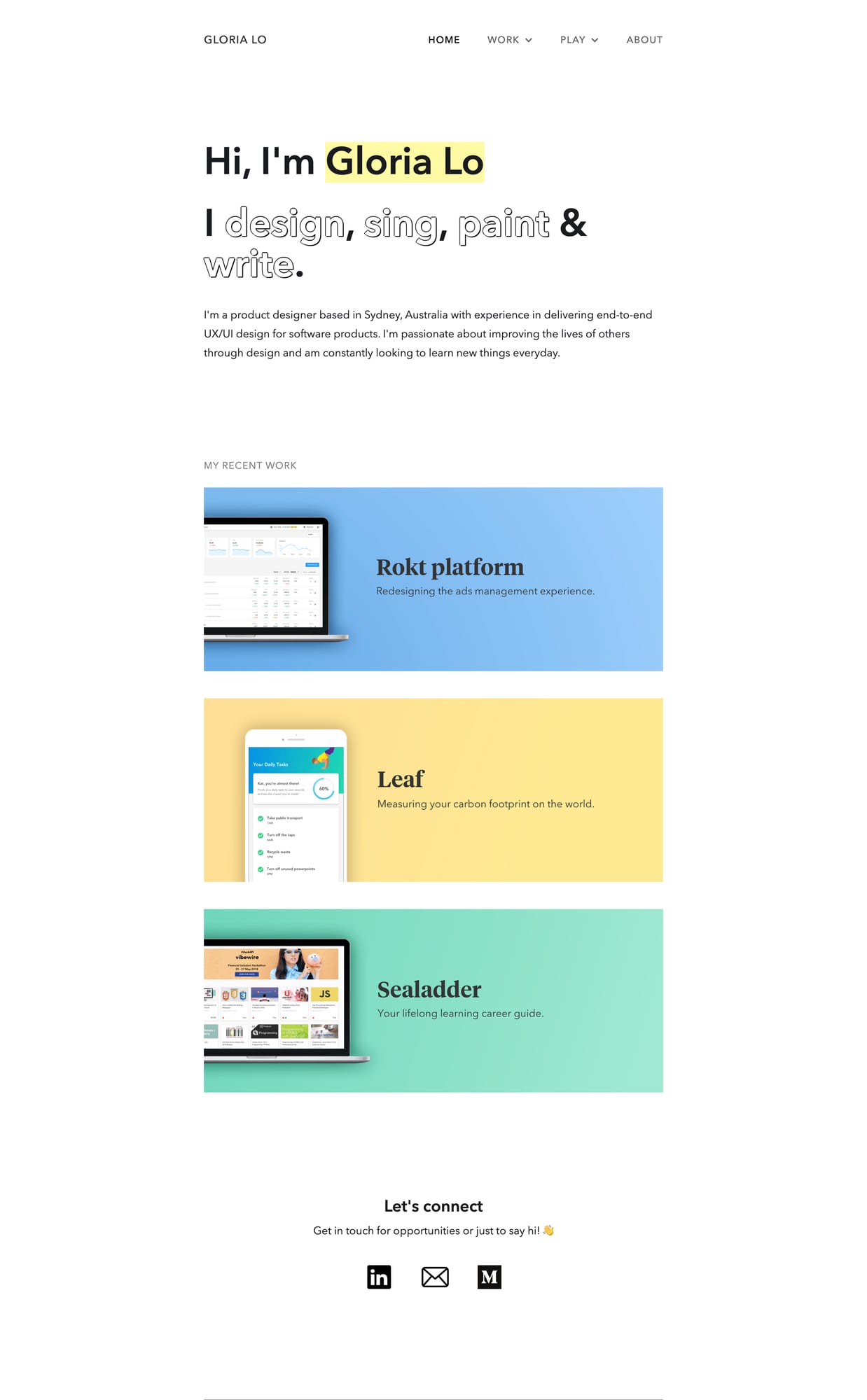
Gloria Lo
Self-taught → Senior at Canva
Master class in high-impact landing pages. Interactive verbs that light up, video testimonials, and a three-tiered introduction that hooks you immediately.
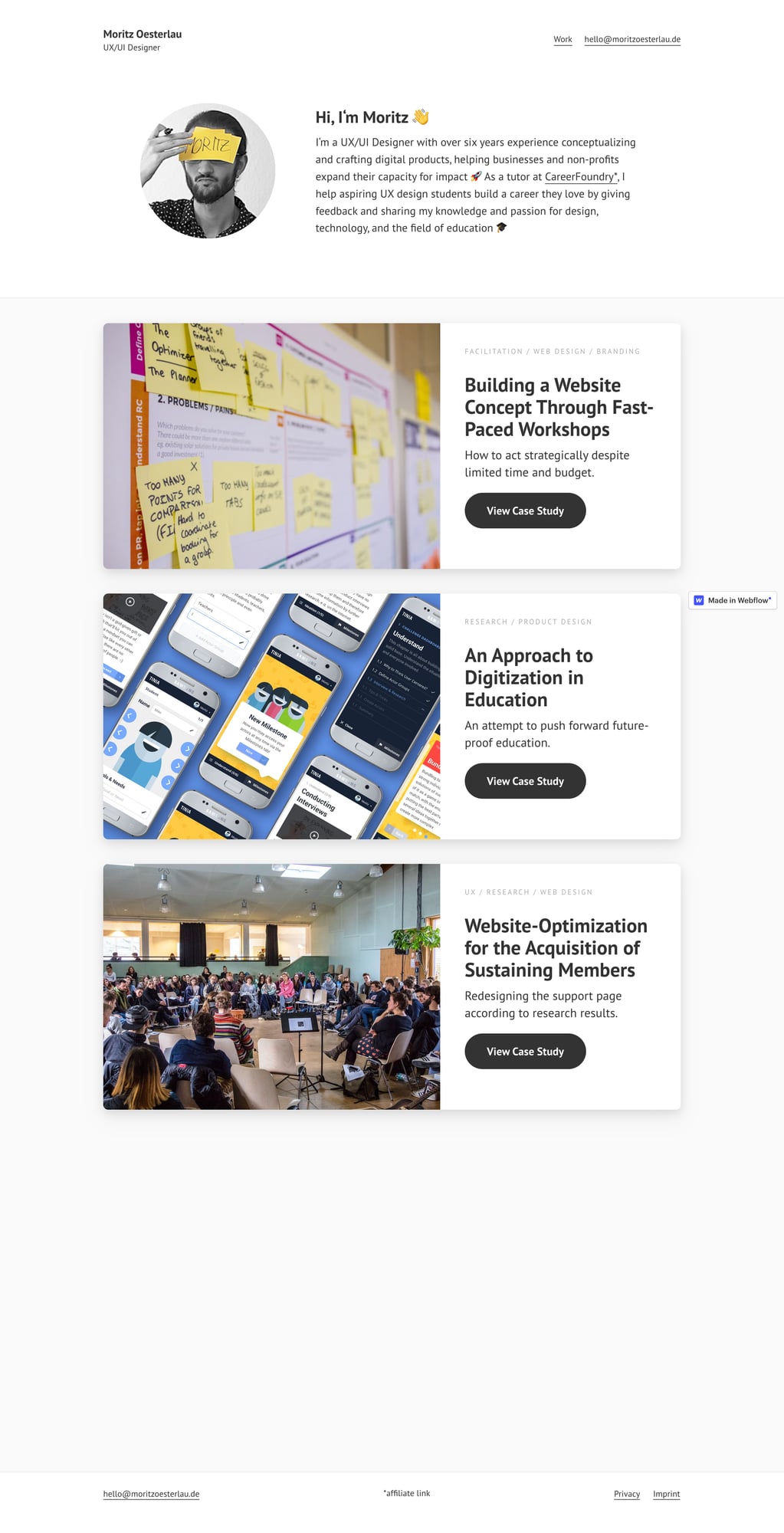
Moritz Oesterlau
CareerFoundry Tutor
Gold standard for process documentation. Extremely detailed case studies with complete process documentation and educational storytelling.
Senior LevelPortfolios That Show Business Impact
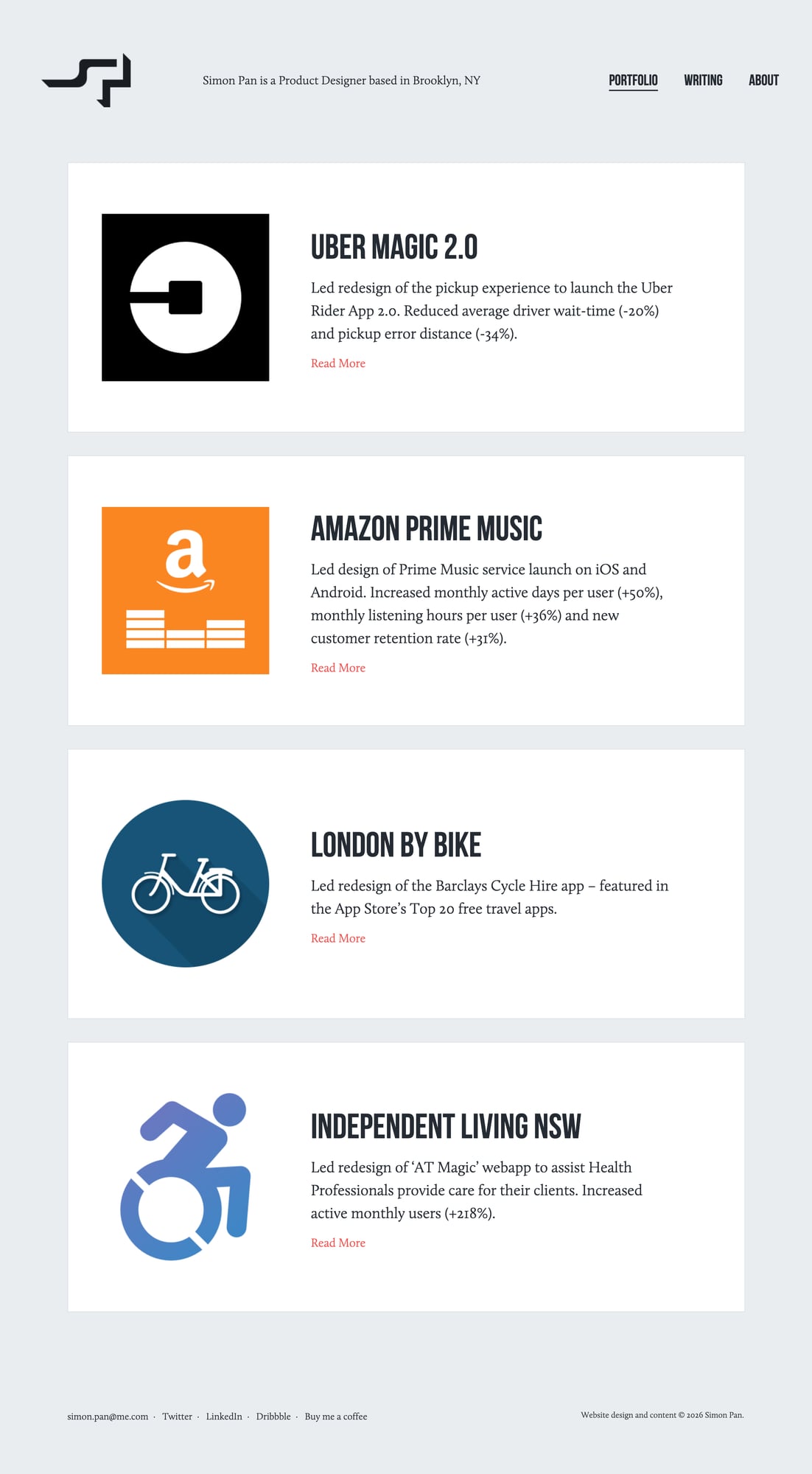
Simon Pan
Uber, Amazon
Gold standard for metrics-driven case studies. Uber pickup redesign: -20% wait time, -34% pickup errors. Amazon Prime Music: +50% active days.
Daniel Autry
Shows the power of specialization and strategic curation. Mental health space focus with only 4 carefully selected projects—quality over quantity.
Career ChangersHow to Leverage Your Previous Experience
Elizabeth Lin
San Francisco
Masters visual storytelling with process artifacts and bite-sized reflections. Shows personality through fashion, teaching, and music interests.
Olivia Truong
Senior Product Designer
Clean problem-framing with question-based project titles. Each case study starts with the user question it solves—great for showing empathy-driven thinking.
🔗 Browse More Portfolio Examples
Common Patterns in Successful Portfolios
Visual Elements:
- • High-quality project thumbnails
- • Consistent visual style throughout
- • Clear typography and hierarchy
- • Plenty of white space
- • Mobile-responsive design
Content Structure:
- • 3-4 detailed case studies
- • Clear project descriptions
- • Process documentation
- • Results and impact metrics
- • Personal story and background
Portfolio Checklist
Use this checklist to ensure your portfolio has all the essential elements:
Hero Section
- Clear, professional headshot
- Compelling tagline that describes your value
- Contact information (email, LinkedIn, location)
- Brief 2-3 sentence bio highlighting your background
Case Studies (3-4 projects)
- Project overview with clear problem statement
- Your role and responsibilities
- Research and discovery process
- Design process with wireframes/prototypes
- Results and impact (quantified when possible)
- Lessons learned and next steps
About Page
- Your story and journey into UX
- Skills and tools you use
- What makes you unique
- Your design philosophy
- Fun facts or personal interests
Technical Requirements
- Mobile-responsive design
- Fast loading times (< 3 seconds)
- Easy navigation and clear information architecture
- Consistent visual design and branding
- Working contact form or clear contact methods
Common Mistakes to Avoid
Learn from these common portfolio mistakes to make yours stand out. For broader design pitfalls beyond portfolios, check our comprehensive design mistakes guide.
Too many projects
Including every project you've ever done
Solution: Focus on 3-4 of your best projects that showcase different skills
Missing context
Jumping straight to solutions without explaining the problem
Solution: Always start with the problem, then show your process
Poor image quality
Blurry screenshots or low-resolution images
Solution: Use high-quality images and consider using mockups or prototypes
Generic descriptions
Vague statements like 'I improved the user experience'
Solution: Be specific about what you did and the impact it had
No personality
Portfolio feels robotic and doesn't show who you are
Solution: Let your personality shine through in your writing and design choices
Project Ideas for Beginners
Need project ideas for your portfolio? Here are some beginner-friendly options that will help you build a strong foundation and showcase your skills effectively.
💡 Not Sure Where to Start?
Look at these platforms for project inspiration and see how other designers present similar work:
Redesign a Local Business Website
Find a local restaurant, coffee shop, or small business with a poor website and redesign it
Redesign a local restaurant's website to improve online ordering
Mobile App for a Problem You Face
Identify a personal pain point and design a mobile app to solve it
Design an app to help people find and book local fitness classes
E-commerce Experience Improvement
Pick an existing e-commerce site and improve the checkout or browsing experience
Redesign checkout flow to reduce cart abandonment
Accessibility Audit and Redesign
Audit a website for accessibility issues and redesign it to be more inclusive
Audit and redesign a news website for better accessibility
How to Choose the Right Projects
Show Diversity
Include different types of projects (mobile, web, desktop) and industries to demonstrate versatility.
Demonstrate Process
Choose projects where you can clearly show your research, ideation, and iteration process.
Tell a Story
Pick projects that have clear problems, solutions, and outcomes you can articulate well.
Project Planning Template
Use this template to plan your portfolio projects effectively:
Before You Start:
- • Define the problem clearly
- • Identify your target users
- • Set success metrics
- • Plan your research approach
- • Choose appropriate tools
During the Project:
- • Document everything
- • Take screenshots of your process
- • Record user feedback
- • Iterate based on findings
- • Measure your results
Stop Building Your Portfolio Blind
You're competing against 10,000+ other designers. Most portfolios get rejected in 30 seconds. Our checklist shows you exactly what hiring managers look for—and what makes them click away.
Based on Real Data
1,000+ portfolio reviews from actual hiring managers
Career Changer Approved
Designed for people transitioning into design
5 Minutes to Clarity
Know exactly what to fix before you start building
Continue Your UX Journey
Making the Career Switch?
Get a complete 12-month roadmap to transition into UX design from any background, with networking strategies and job search tactics.
UX Career Transition FrameworkProfessional Headshots & Branding
Learn DIY photography techniques and styling tips to create professional headshots that build credibility for your portfolio.
Professional Headshot GuideBeginner Portfolio Questions
Quick answers to help you get started
Share this resource

Written by
The CritUX portfolio research & guidance
Designer, educator, founder of The Crit. I've spent years teaching interaction design and reviewing hundreds of student portfolios. Good feedback shouldn't require being enrolled in my class — so I built a tool that gives it to everyone. Connect on LinkedIn →
Too close to your own work?
Send one screen, case study, or URL. We'll show what's working, what's getting skipped, and what to fix next.
Continue Reading
All resources →Get one actionable portfolio tip every week. No fluff.
Short reads you can use on your site. Unsubscribe anytime.