⚡ TL;DR
- • DIY headshots: Natural light and smartphone can work
- • Smart styling: What to wear and what to avoid
- • Professional option: When and how to hire a photographer
- • Platform strategy: Use consistently across all profiles
First Impressions Are Everything
People absolutely judge your professional credibility by a tiny thumbnail photo. Your headshot is the first thing they see on LinkedIn, your portfolio, and everywhere else — so it's worth getting right.
❌ Headshot Red Flags
- • Pixelated selfie taken in bathroom mirror
- • Cropped from party photo with friends visible
- • Wearing sunglasses or hat that obscures face
- • Overly filtered or heavily retouched
- • Inconsistent across different platforms
✅ Professional Standards
- • High resolution with clean background
- • Appropriate professional attire
- • Clear eyes and genuine smile
- • Consistent lighting and composition
- • Looks like you in person
These standards apply whether you DIY or hire a professional photographer
Bad Headshots Kill Opportunities
- •Pixelated selfies make you look unprofessional
- •Overly casual photos don't match design roles
- •Outdated photos break trust when you meet
- •No photo at all makes you forgettable
Good Headshots Open Doors
- •People remember you after meetings
- •LinkedIn views and connection requests increase
- •You look competent and trustworthy
- •Consistent branding across all platforms
DIY vs Professional: The 2-Minute Decision
Quick Decision Tree
✅ Go DIY if:
- • Budget under $200
- • Need photos quickly (within a week)
- • Comfortable with smartphones/basic editing
- • Working at startups or creative companies
- • Building personal brand gradually
💼 Hire a Pro if:
- • Actively job hunting or career pivoting
- • Targeting corporate/enterprise roles
- • Building personal brand for speaking/consulting
- • Previous DIY attempts look unprofessional
- • Budget allows $300+ investment
DIY Headshots That Don't Suck
You don't need a $2000 camera or professional studio. Your smartphone and natural light can produce headshots that look professional if you know what you're doing.
Equipment Setup
Budget: $50-150 for basic setup
Key Tips:
- •Use a smartphone with good camera (iPhone 12+ or equivalent Android)
- •Invest in a tripod or stable surface for consistent framing
- •Use natural lighting near a large window
- •Avoid direct sunlight - use diffused light
- •Clean your camera lens before shooting
Recommended Tools:
Composition & Framing
Key Tips:
- •Frame from chest up (head and shoulders)
- •Leave space above your head for cropping
- •Center yourself in the frame
- •Use the rule of thirds for dynamic composition
- •Take multiple angles and expressions
Technical Specs:
- Aspect ratio: 1:1 for social media, 3:4 for print
- Resolution: Minimum 1000x1000 pixels
- File format: JPEG or HEIC for quality
- Multiple shots: 20-30 photos per session
Background & Environment
Key Tips:
- •Choose a clean, uncluttered background
- •Use solid colors or simple patterns
- •Avoid busy or distracting backgrounds
- •Consider your brand colors for consistency
- •Ensure good contrast with your clothing
Good Options:
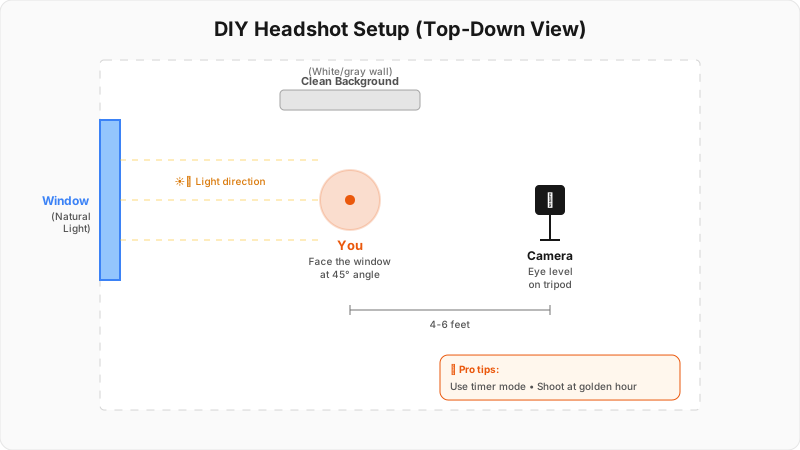
Complete DIY headshot setup guide with equipment positioning and lighting tips
Quick DIY Setup
For a basic setup that works every time:
- 1. Find a big window with soft, indirect light
- 2. Set up your phone on a tripod 4 feet away
- 3. Use a white wall or simple background
- 4. Take 20-30 shots with different expressions
- 5. Pick the best one and do basic editing
When to Hire a Pro
Sometimes you need to invest in professional headshots. If you're job hunting, building a personal brand, or DIY isn't working out, a good photographer is worth the money.
Portrait Specialist
$200-500 per sessionPhotographer who specializes in professional headshots
Pros:
- +Expert lighting
- +Professional equipment
- +Posing guidance
- +High-quality results
Cons:
- -Higher cost
- -May be less flexible
- -Scheduled sessions
Best for: High-quality results, professional presentation
Lifestyle Photographer
$150-300 per sessionPhotographer who captures natural, candid moments
Pros:
- +More relaxed atmosphere
- +Natural expressions
- +Creative approach
- +Often more affordable
Cons:
- -May be less formal
- -Variable results
- -Less headshot experience
Best for: Creative professionals, authentic feel
Studio Photographer
$300-800 per sessionPhotographer with professional studio setup
Pros:
- +Controlled environment
- +Professional lighting
- +Multiple backgrounds
- +Consistent results
Cons:
- -Less personal
- -May feel staged
- -Higher cost
Best for: Corporate professionals, formal presentation
Photography Tools & Resources
DIY Photography Tools
Professional photo editing and retouching
Photo organization and basic editing
Free photo editing and templates
Photographer Resources
Find local photographers by budget and style
Read reviews and see photographer portfolios
Browse photographer work and find local talent
Hiring Tips
- • Look at their portfolio—do the people look like you?
- • Ask for 3-5 final edited photos minimum
- • Discuss usage rights (social media, print, etc.)
- • Book during their non-peak times for better rates
- • Get a clear timeline for receiving final images
What to Wear (And What to Avoid)
Your outfit makes or breaks your headshot. The wrong clothes distract from your face. The right clothes make you look polished and professional.
Wardrobe Selection
Essential Tips:
- •Choose solid colors over patterns
- •Avoid bright, distracting colors
- •Wear clothes that fit well and are comfortable
- •Bring 2-3 outfit options to the shoot
- •Consider your brand and industry
Best Colors:
- Navy blue - professional and trustworthy
- Charcoal gray - sophisticated and modern
- White or cream - clean and approachable
- Deep jewel tones - confident and creative
Avoid These:
Hair & Makeup
Essential Tips:
- •Keep hair neat and styled
- •Avoid drastic changes before the shoot
- •Use natural makeup that enhances features
- •Consider professional makeup for important shoots
- •Bring hair styling tools for touch-ups
Professional Approach:
- $Hire a professional makeup artist
- $Schedule hair appointment same day
- $Bring reference photos of desired look
- $Test makeup and hair beforehand
DIY Approach:
- ✓Use natural, flattering makeup
- ✓Style hair simply and professionally
- ✓Avoid trendy or experimental looks
- ✓Focus on clean, polished appearance
Accessories & Details
Essential Tips:
- •Keep accessories minimal and professional
- •Choose jewelry that complements your outfit
- •Ensure glasses are clean and properly fitted
- •Consider your industry when selecting accessories
- •Bring backup options for different looks
Professional Approach:
- $Simple, elegant jewelry
- $Professional watch or minimal accessories
- $Clean, well-maintained glasses
- $Polished shoes (if visible in shot)
For Creative Fields:
- ✨Unique but tasteful accessories
- ✨Items that reflect your personality
- ✨Creative elements that show your style
- ✨Avoid anything too distracting
Color Psychology for Designers
Navy Blue: Trustworthy, professional, reliable
Charcoal Gray: Modern, sophisticated, versatile
White/Cream: Clean, approachable, fresh
Deep Green: Confident, creative, balanced
Lighting Makes or Breaks Everything
Good lighting can make anyone look professional. Bad lighting makes even attractive people look unprofessional. Here are the lighting setups that actually work.
Natural Light
Using window light for soft, flattering illumination
Setup Instructions:
- 1.Position yourself 3-5 feet from a large window
- 2.Face the window for even lighting
- 3.Use a white reflector on the shadow side
- 4.Avoid direct sunlight - use diffused light
- 5.Shoot during golden hour for warm tones
Advantages:
- +Free
- +Soft and flattering
- +Natural skin tones
- +Easy to set up
Limitations:
- -Weather dependent
- -Limited control
- -Time constraints
Best for: DIY photography, natural look
Ring Light
Circular light that provides even, shadow-free illumination
Setup Instructions:
- 1.Position ring light at eye level
- 2.Stand 2-3 feet from the light
- 3.Use diffuser for softer light
- 4.Adjust brightness to avoid overexposure
- 5.Use white background for clean look
Advantages:
- +Even lighting
- +Reduces shadows
- +Portable
- +Consistent results
Limitations:
- -Can look flat
- -May create harsh shadows
- -Requires power
Best for: Consistent results, social media content
Three-Point Lighting
Professional lighting setup with key, fill, and back lights
Setup Instructions:
- 1.Key light: Main light source at 45-degree angle
- 2.Fill light: Softer light on opposite side
- 3.Back light: Light behind subject for separation
- 4.Use softboxes or umbrellas for diffused light
- 5.Adjust ratios for desired effect
Advantages:
- +Professional quality
- +Full control
- +Dramatic effects
- +Studio quality
Limitations:
- -Requires equipment
- -Complex setup
- -Higher cost
Best for: Professional shoots, high-quality results
Edit Smart, Not Fake
Over-retouched headshots fool nobody. If you don't look like your photo in person, it backfires. Good editing enhances your natural look without making you unrecognizable.
Basic Adjustments
What to Do:
- •Crop to proper headshot proportions
- •Adjust exposure and contrast for natural look
- •Enhance colors without oversaturation
- •Sharpen image for crisp details
- •Remove any distracting elements
Recommended Tools:
Sample Settings:
- Exposure: +0.5 to +1.0
- Contrast: +10 to +20
- Vibrance: +5 to +10
- Clarity: +5 to +15
Skin Retouching
What to Do:
- •Remove blemishes and temporary marks
- •Smooth skin texture subtly
- •Enhance eyes and teeth naturally
- •Avoid over-retouching for authentic look
- •Maintain natural skin texture
Recommended Tools:
Guidelines:
- ✓Keep retouching subtle and natural
- ✓Don't change facial features
- ✓Maintain skin texture and pores
- ✓Focus on temporary imperfections only
Color Correction
What to Do:
- •Balance skin tones for natural appearance
- •Adjust white balance for accurate colors
- •Enhance eye color subtly
- •Ensure consistent lighting across image
- •Create warm, inviting skin tones
Recommended Tools:
Advanced Techniques:
- ✨Use color grading for mood
- ✨Adjust temperature and tint
- ✨Enhance specific color ranges
- ✨Create consistent color palette
Retouching Red Flags
- • Skin so smooth it looks like plastic
- • Eyes that are unnaturally bright or blue
- • Teeth that are pure white (not natural)
- • Face shape or features that look different
- • Clothing or background that looks artificially clean
Use It Everywhere, Consistently
Using a different photo on every platform? That's confusing for the people trying to find and recognize you. Consistent headshots across LinkedIn, your portfolio, and email strengthen your professional brand.
LinkedIn Profile
Requirements:
- •Square format (400x400 pixels minimum)
- •Professional, approachable expression
- •Clean, uncluttered background
- •High resolution for quality
- •Consistent with professional brand
Best Practices:
- →Use same photo across all professional platforms
- →Update every 2-3 years or after major changes
- →Ensure photo represents current appearance
- →Test how it looks at different sizes
Portfolio Website
Requirements:
- •High resolution for web display
- •Consistent with overall design aesthetic
- •Professional but approachable
- •Good contrast with background
- •Multiple sizes for responsive design
Best Practices:
- →Use in About section and contact pages
- →Consider different crops for different uses
- →Ensure it matches your brand colors
- →Test on different devices and screens
Social Media
Requirements:
- •Platform-specific dimensions
- •Consistent across all platforms
- •High quality but optimized file size
- •Professional yet personal
- •Reflects your brand personality
Best Practices:
- →Use same photo across all platforms
- →Optimize file size for fast loading
- →Consider platform-specific requirements
- →Update regularly to stay current
Platform Dimensions
LinkedIn: 400x400px
Portfolio: Variable, high-res
Twitter: 400x400px
Instagram: 1080x1080px
Email: 200x200px
Business cards: 300 DPI
Your Headshot Action Plan
Here's your step-by-step plan. Don't skip phases—each one builds on the previous one.
Phase 1: Planning & Preparation
Phase 2: Photography Session
Phase 3: Editing & Retouching
Phase 4: Implementation & Usage
Quick Quality Check
Before you use your headshot everywhere, ask:
- • Does it look like you when people meet you in person?
- • Would you hire this person based on this photo?
- • Is it crisp and clear when displayed small?
- • Does it match your professional brand?
- • Are you genuinely happy with how you look?
Everything You Need to Know
Quick answers to help you get started