⚡ TL;DR
- • 3-second rule: Users bounce if your portfolio loads slowly
- • Core Web Vitals: Google measures and ranks based on these metrics
- • Images first: Usually the biggest performance bottleneck
- • Easy wins: Modern hosting and CDN solve 80% of problems
Speed Kills Portfolios
An 8-second load time means most visitors never see your work. Nobody waits around for slow sites anymore. Google ranks fast sites higher, and users bounce faster than you can say "creative process."
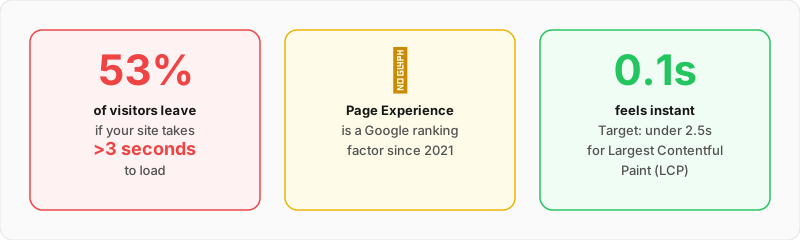
Source: Google Web Vitals research and mobile performance studies
Speed Reality Check
53% of mobile users
Leave sites that take more than 3 seconds to load
Google Page Experience
Site speed is now a ranking factor for search results
First impressions
Slow = unprofessional in hiring managers' minds
Mobile is worse
Slower connections mean speed matters even more
The good news? Most speed problems have simple fixes. You don't need to be a performance expert to have a fast portfolio.
The Numbers That Matter
Google measures your site with Core Web Vitals. These three metrics determine if your portfolio feels fast or slow to users.
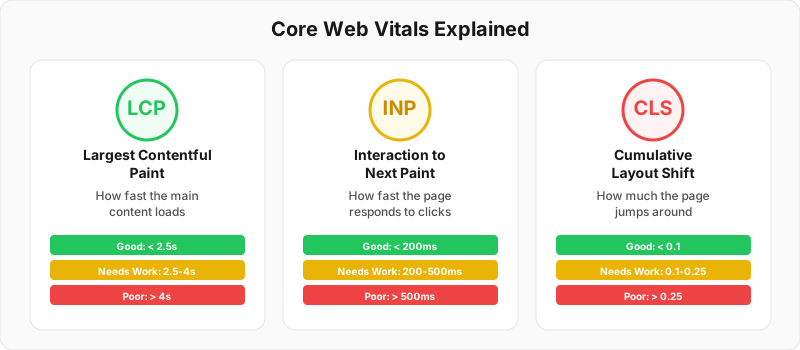
Core Web Vitals metrics and their impact on user experience
Largest Contentful Paint
How long until the biggest thing on your page loads
Common fixes:
- • Optimize your hero image (usually the largest element)
- • Use WebP image format instead of JPEG/PNG
- • Remove render-blocking CSS and JavaScript
- • Use a CDN to serve images faster
First Input Delay
How long until someone can click/tap something
Common fixes:
- • Reduce JavaScript execution time
- • Remove unused third-party scripts
- • Split large JavaScript bundles
- • Avoid heavy animations on page load
Cumulative Layout Shift
How much stuff jumps around while loading
Common fixes:
- • Set width/height on images and videos
- • Reserve space for ads or dynamic content
- • Avoid inserting content above existing content
- • Use CSS containment for animations
Fix Your Images First
Images are usually 60-80% of your page weight. Fix them first, get the biggest speed improvement. For detailed compression techniques and tools, check our complete image optimization guide.
Image Format Strategy
✅ WebP
50% smaller than JPEG. Supported everywhere now.
✅ AVIF
Even smaller than WebP. Use with WebP fallback.
❌ Large PNGs
Huge file sizes. Only for logos/icons.
Responsive Images
Serve different image sizes to different screen sizes. Don't send 4K images to phones.
Quick wins:
- • Use Next.js Image component (automatically optimizes)
- • Compress images before uploading (TinyPNG, Squoosh)
- • Lazy load images below the fold
- • Set explicit width/height to prevent layout shift
Free Image Optimization Tools
Free, simple image compression with format conversion
Most popular compression tool, drag and drop
Image Size Guidelines
Clean Up Your Code
Heavy JavaScript and CSS slow down your portfolio. Here's what actually makes a difference.
JavaScript Optimization
Remove unused libraries
That jQuery you're not using? Delete it.
Defer non-critical JS
Analytics, social media buttons can load later
Split large bundles
Load only what each page needs
CSS Optimization
Inline critical CSS
Above-the-fold styles in the HTML head
Remove unused CSS
PurgeCSS can cut CSS files by 90%
Minify everything
Remove whitespace and comments
Font Loading
• Use font-display: swap to prevent invisible text
• Preload critical fonts in HTML head
• Limit custom fonts (2-3 variations max)
• Consider system fonts for body text
2026 Performance Updates
• Interaction to Next Paint (INP) replaces FID in March 2026 - measures response to all interactions, not just first
• AVIF image format now has 95%+ browser support - use for even smaller file sizes than WebP
• Container queries reduce layout shifts - use for responsive component design
• View Transitions API provides smooth page transitions without JavaScript frameworks
• Critical Resource Hints (fetchpriority) help browsers prioritize important assets
Hosting That Helps
Your hosting choice makes a huge difference. Modern hosting platforms handle most optimization automatically.
Recommended Platforms
✅ Vercel
Built for Next.js. Global CDN, automatic optimization.
✅ Netlify
Great for static sites. CDN, image optimization included.
✅ Cloudflare Pages
Fast CDN, good free tier, automatic optimization.
❌ Shared hosting
Slow, no CDN, requires manual optimization.
CDN Benefits
Content Delivery Networks serve your files from servers close to your users.
Speed improvements
- • Faster image loading worldwide
- • Reduced server response time
- • Automatic compression and optimization
Additional benefits
- • Better reliability and uptime
- • DDoS protection
- • SSL certificates included
Test and Monitor
You can't improve what you don't measure. These tools show you exactly what's slowing down your portfolio.
Essential Testing Tools
Google PageSpeed Insights →
Free, shows Core Web Vitals, gives specific recommendations
Lighthouse (Chrome DevTools) →
Built into Chrome, detailed performance audit
GTmetrix →
Waterfall charts, before/after comparisons
WebPageTest →
Test from different locations and devices
Performance Monitoring
Set up alerts
Get notified if your portfolio gets slow
Test regularly
Check speed after adding new projects or features
Test on real devices
Your phone's experience matters more than lab scores
Speed Check Your Portfolio
Submit your portfolio and we'll run it through comprehensive speed tests. Get specific recommendations for your setup.
Test Portfolio SpeedRelated Resources
Everything You Need to Know
Quick answers to help you get started