Adobe Creative Suite: What You Actually Need in 2026
Honest breakdown of Adobe apps: which are essential, which you can skip, and when alternatives are genuinely better. Updated for current pricing and features.

⚡ TL;DR
- Essential apps: Photoshop, Illustrator, and InDesign still dominate their categories — nothing else comes close for pro work
- Skip these: Adobe XD is dead, Dimension is niche, Animate has limited use cases
- Smart strategy: Most designers only need 2-3 apps, not the full $70/mo suite
- Alternatives: Affinity Suite and Canva Pro are genuinely competitive in specific areas
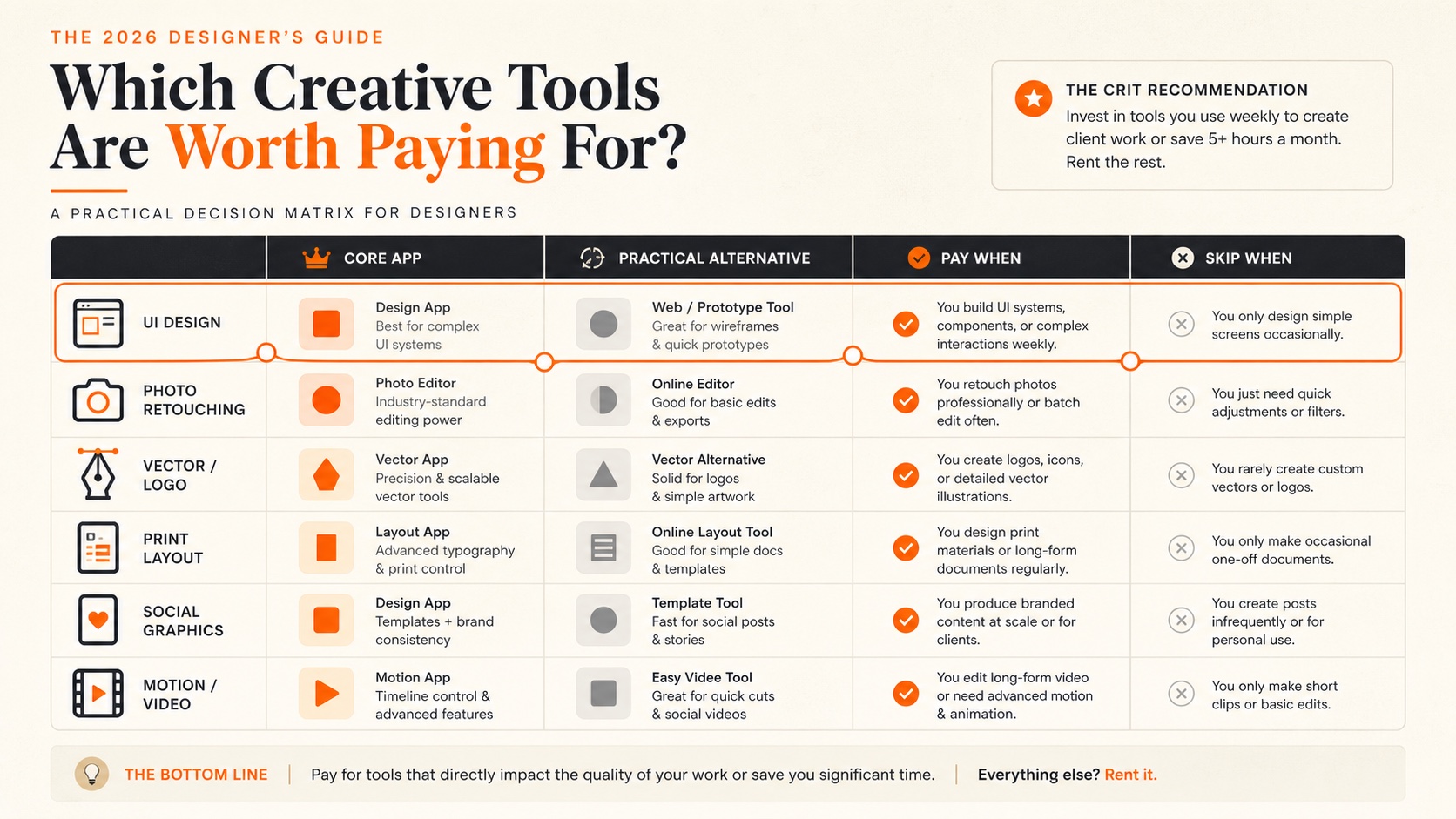
The 2026 Reality Check
I've been watching the design tools landscape shift for a while now, and the current reality is clearer than it was a year ago. Adobe still dominates specific categories — nobody's honestly arguing that Photoshop has a true equal for complex photo manipulation — but the story of "you need Creative Cloud for everything" is falling apart.
Here's what struck me when I looked at my own tool usage last month: I opened Photoshop almost every day. Illustrator maybe twice a week. InDesign once in three weeks. And the other 17+ apps bundled in Creative Cloud? I couldn't tell you the last time I touched most of them. I was paying $70/month for three apps.
And I'm not alone. When I talk to designers at agencies, in-house teams, and freelance practices, the pattern is consistent: most people use 2-3 Adobe apps regularly and ignore the rest. The "full suite" pitch only works if you're doing everything from video editing to web development inside Adobe's ecosystem. Most of us aren't.
The Current Landscape at a Glance
Still Adobe Territory
- Professional photo editing and compositing (Photoshop)
- Precision vector illustration and logo design (Illustrator)
- Print layout and long-form publishing (InDesign)
- Motion graphics and video post-production (After Effects)
Strong Alternatives Exist
- UI/UX design — Figma has completely won
- Basic photo editing — Affinity Photo, Canva Pro
- Web design — Figma, Framer, Webflow
- Social media and brand basics — Canva Pro
Firefly AI integration remains the biggest practical change. Generative Fill and Expand in Photoshop are genuinely useful — not gimmicks. Apple Silicon performance has also improved substantially. Cloud collaboration features have gotten better, though they still feel awkward compared to Figma's real-time approach. And Adobe now lets you pause subscriptions, which tells you something about how many people were canceling.
Adobe polish can still hide a weak piece.
Upload one layout, portfolio piece, or visual system. We'll flag what looks current, what feels dated, and what to fix next.
What Adobe Still Dominates
Despite my skepticism about the full suite, I want to be honest: Adobe's core apps remain the best at what they do. These aren't apps you stick with because of habit — they're apps you stick with because nothing else offers the same depth. If you're building a portfolio that showcases professional-grade work, knowing these tools matters.
What's Actually Changed
- Firefly AI: Integrated across all major apps — Generative Fill, Expand, and improved image generation that actually understands context
- Apple Silicon optimization: M1/M2/M3/M4 Macs now run Photoshop and Illustrator noticeably faster than Intel equivalents
- Cloud collaboration: Enhanced real-time sharing and commenting — still not Figma-level, but usable
- Subscription pausing: You can now pause for up to 90 days, twice per year — a tacit admission of subscription fatigue
Photoshop: Still the Photo Editing King
Photoshop remains unmatched for serious photo manipulation, compositing, and digital art. I've tried every alternative — Affinity Photo gets closest, but the gap is still real for professional-level work. Firefly integration has made Generative Fill actually reliable, and the Neural Filters that felt gimmicky at launch now produce genuinely usable results.
Advanced Selection Tools
Object Selection, Select and Mask, and AI-powered Subject Selection work incredibly well. Nothing else comes close for complex extractions and hair masking.
Firefly AI Integration
Generative Fill and Expand are legitimate game-changers. Create realistic backgrounds, extend images, and remove objects with AI that understands context and lighting.
Non-Destructive Workflow
Smart Objects, Adjustment Layers, and Layer Masks create a completely reversible and flexible workflow. Essential for professional retouching.
Digital Art Tools
Kyle T. Webster brushes, improved brush engine, and better stylus support. Competitive with dedicated digital art apps like Procreate.
Strengths
- + Unrivaled selection and masking tools
- + Industry-standard for photo retouching
- + Massive plugin ecosystem
- + Advanced compositing capabilities
- + Excellent digital painting tools
Weaknesses
- - Expensive for casual users ($22.99/mo)
- - Steep learning curve for beginners
- - Overkill for basic photo edits
- - Subscription-only — no perpetual license
Reality check:If you only crop, resize, and do basic adjustments, you're massively overpaying. Canva Pro, Affinity Photo, or even Apple Photos handles simple edits just fine. Photoshop earns its subscription when you need layer-based compositing, advanced retouching, or precise color management.
Illustrator: Vector Graphics Champion
For logo design, illustration, and complex vector work, Illustrator remains the gold standard. The precision and control it offers for paths and curves is unmatched. I've used Affinity Designer and Figma's vector tools — both are good, but neither gives me the same level of fine-grained path control that Illustrator does. Recent updates improved performance and added better variable font support.
Precision Path Editing
When you're designing a logo that needs to scale from business card to billboard, the anchor point control and mathematical precision are essential. The Pen Tool alone justifies the subscription for logo designers.
Typography Excellence
Advanced text on path, character and paragraph styles, and excellent OpenType support. For designers who care about detailed visual precision, the typography controls are leagues ahead.
Color Management
Proper CMYK support, spot colors, and color separation for print. Essential if you're doing brand work that needs to translate perfectly from screen to print.
Pattern and Gradient Tools
Complex gradient meshes, pattern generation, and the Recolor Artwork feature are capabilities you won't find this deep in any alternative.
Strengths
- + Precision vector tools and path editing
- + Excellent typography controls
- + Industry standard for logo design
- + Advanced gradient and pattern tools
- + Great for print preparation
Weaknesses
- - Not great for UI/web design workflows
- - Complex interface for beginners
- - Artboard management could be better
- - Expensive for occasional use ($22.99/mo)
UI designer alert: If you're primarily designing for web and mobile, Figma's vector toolsmight be all you need. Illustrator's complexity can actually slow down digital-first workflows. Save it for when you need true print-ready precision.
InDesign: Layout and Typography Master
For serious layout work — magazines, books, complex multi-page documents — InDesign genuinely has no real competitor. I've tried Affinity Publisher, and while it's getting closer, InDesign's master pages, GREP styles, and data merge capabilities are still in a different league. Recent updates improved variable font support and collaborative editing workflows.
Professional Typography
Paragraph styles, character styles, nested styles, GREP styles — the typographic control is extraordinary. Essential for magazines, books, and high-end print.
Master Pages and Templates
Create consistent layouts across hundreds of pages. Auto page numbering, headers, footers, and style consistency that scales to enterprise projects.
Data Merge and Automation
Generate hundreds of customized layouts from databases. Perfect for catalogs, directories, and variable data publishing.
Print Production
Preflight checks, color separation, bleed handling, and PDF export settings that ensure your designs print exactly as intended.
Strengths
- + Advanced typography and text formatting
- + Excellent multi-page document handling
- + Professional color management
- + Powerful styles and master pages
- + Data merge for variable content
Weaknesses
- - Overkill for simple layouts
- - Steep learning curve for text formatting
- - Limited digital interactivity
- - Subscription cost for infrequent use
Overkill warning:If you're making simple flyers, social media graphics, or one-page handouts, InDesign is massive overkill. Canva Pro or even PowerPoint will be faster and cheaper. InDesign earns its keep when you're managing 50+ page documents with consistent styles.
What You Can Skip Now
Creative Cloud includes 20+ apps, but most designers only use 2-3 regularly. The rest? Either redundant, outdated, or so specialized they're not worth the subscription cost for most people. Here's what you can safely skip — and what to use instead.
Usage Reality Check
Apps Most Designers Actually Use
- - Photoshop (roughly 90% of designers)
- - Illustrator (roughly 75%)
- - InDesign (roughly 40%)
- - After Effects (roughly 25%)
Apps Sitting Unused in Your Dock
- - Adobe XD (development discontinued)
- - Dimension (3D rendering)
- - Animate (Flash successor)
- - Dreamweaver (web development relic)
- - Bridge (file management from 2005)
Adobe XD: Officially Dead
Adobe ended new feature development for XD in late 2022, after regulators blocked their $20 billion Figma acquisition. XD still technically exists, but it's frozen in time. Meanwhile, Figma has completely dominated UI/UX design with superior collaboration, better developer handoff, and constant innovation. If you're comparing the two, the full story of how Figma overtook XD is worth reading.
Use instead: Figma (industry standard), Framer (advanced interactions), or Sketch (Mac only, still decent).
Adobe Dimension: Very Niche
3D mockups and product visualization. It's useful for packaging previews if you're doing that kind of work, but most designers never touch it. The learning curve is steep relative to how often you'd actually use it.
Consider instead: Blender (free and vastly more capable), Cinema 4D, or online mockup generators like Placeit.
Adobe Animate: Limited Use Cases
Good for 2D animation and interactive content, but most modern animation happens elsewhere. The HTML5/Canvas export is decent, but the learning curve is steep for what you get. Most UI animation work is happening through CSS, Lottie files, or After Effects these days.
Consider instead: Lottie files via Bodymovin, CSS animations, or After Effects for proper motion graphics.
Adobe Dreamweaver: A Web Development Relic
Once the go-to for web design, Dreamweaver feels ancient compared to modern web development tools. The code editor is clunky, the visual design features are years behind current web standards, and the WYSIWYG approach produces code that makes actual developers cringe.
Use instead: VS Code (free and excellent), Webflow (visual web design), or Framer (design-to-code).
Adobe Bridge: File Management from 2005
Bridge was useful when Finder and Explorer couldn't preview creative files well. Now macOS and Windows handle previews natively, cloud storage makes local file browsing less relevant, and dedicated DAM tools do asset management far better.
Use instead: Your OS file browser, or cloud storage (Dropbox, Google Drive) with native preview.
Smart Pricing Strategies
Adobe pricing is deliberately confusing. Annual plans with monthly billing, early cancellation fees, bundle discounts that only make sense if you do the math — it's designed to keep you subscribed. Here's how to actually think about it.
Adobe Pricing Reality Check
The math that matters:If you only need 2 apps, you're paying $45.98/month versus $69.99 for everything. The full suite only makes financial sense if you regularly use 3+ apps. At 3 individual apps ($68.97/mo), you might as well get the full suite. Below that, you're overpaying.
Annual reality:That's $839.88 per year for all apps, or $551.76 for two single apps. For many freelancers, that's a significant business expense that needs to justify itself with billable work.
Strategic Subscription Management
The Pause Strategy
Adobe now lets you pause subscriptions for up to 90 days, twice per year. Perfect for freelancers with seasonal work. If you have a slow quarter, pause instead of paying for apps you're not using.
The Project-Based Approach
Subscribe for specific projects, then cancel. Yes, there's a cancellation fee within the first year of an annual plan, but for short-term needs, a month-to-month plan (higher monthly cost, no commitment) can be cheaper than an annual commitment you won't fully use.
The Education Discount
Students and teachers get Creative Cloud for around $20/month — that's a 60% discount. If you're learning or teaching design in any capacity, this is far and away the best deal Adobe offers. Verify eligibility through SheerID.
The Photography Plan Hack
The Photography Plan at $19.99/month gets you Photoshop + Lightroom + Lightroom Classic + 1TB cloud storage. If Photoshop is your primary app, this is cheaper than subscribing to Photoshop alone at $22.99/month. Seriously.
Subscription Traps to Avoid
Annual "discounts":Adobe heavily pushes annual plans with lower monthly prices, but you're locked in for a year with hefty cancellation fees (50% of remaining months).
Auto-renewal surprise: Adobe is notorious for making cancellation difficult. Set calendar reminders to evaluate your subscription before renewal dates.
Hidden storage costs:Cloud storage fills up fast with large design files. Additional storage costs extra, and you can't access your cloud files if you cancel your subscription.
Strategies by User Type
Your discipline and career goals should drive your software choices, not just what's "industry standard." Here's what I'd actually recommend based on how you work.
UI/UX Designers
Digital product design
Figma handles 90% of your daily work. Add Photoshop only when you need to edit photos or create raster assets that Figma can't handle. Consider Illustrator as an optional add-on for custom icon work, but Figma's vector tools cover most icon needs. If you're building your portfolio, design system templates can speed up both your work and your case studies.
Monthly cost: $0-22.99 (Figma free tier + optional Photoshop). Compare that to $69.99 for the full suite.
Brand and Identity Designers
Logos, identity systems, packaging
Illustrator for vector work and logo design, Photoshop for photo editing and mockups. Add InDesign only if you regularly produce brand guidelines, style guides, or other multi-page documents. Two apps at $45.98/month covers most brand design needs.
Monthly cost: $45.98 for two apps. Add InDesign ($22.99) only when needed for guidelines docs — at that point ($68.97), you might as well get the full suite.
Print and Editorial Designers
Magazines, books, marketing materials
This is the one user type where the full Creative Cloud actually makes sense. You likely need InDesign for layouts, Illustrator for graphics, Photoshop for images, and possibly Acrobat for PDF workflows. At $69.99/month for all apps versus $68.97 for three individual apps, the full suite is basically the same price with added flexibility.
Monthly cost: $69.99 for the full suite. One of the few scenarios where this is genuinely the right call.
Students and Educators
Learning and teaching design
Get the education plan at roughly $20/month for all apps — it's the best deal Adobe offers, period. Learn the core three (Photoshop, Illustrator, InDesign) even if you plan to use alternatives later. Adobe proficiency is still expected in many job postings, and understanding the fundamentals of design matters more than any specific tool.
Monthly cost: ~$20 for all apps. Also learn Figma (free) — the combination makes you competitive across disciplines.
Hobbyists and Side-Hustlers
Personal projects, occasional client work
Start with free or cheap alternatives: Canva Pro ($14.99/mo), Figma (free), and Affinity Suite ($169.99 one-time). You can produce professional-quality work with these tools for 80% of common design tasks. Only subscribe to Adobe apps when you hit genuine limitations that alternatives can't solve.
Monthly cost:$0-14.99. Save hundreds per year compared to Adobe subscriptions you'd barely use.
When to Choose Alternatives
Adobe has conditioned us to think their tools are essential, but the creative landscape has changed. Many alternatives now offer 80-90% of Adobe's functionality at a fraction of the cost — and sometimes with better user experiences. The key is knowing where they excel and where they fall short.
The 80/20 rule:Most designers use 20% of Adobe's features 80% of the time. Alternatives excel at covering that crucial 20% without the complexity and cost of the full suite. The question isn't "is Adobe better?" — it's "is it better enough to justify the price difference for how I work?"
Affinity Suite: The Ownership Alternative
Affinity Photo, Designer, and Publisher offer professional-grade alternatives to Adobe's big three. The key difference? You buy them once and own them forever. No subscriptions, no recurring fees, no worrying about losing access to your tools if you stop paying.
What works great: Professional photo editing, vector design, and basic layout work. About 90% feature parity with Adobe for everyday tasks.
What's missing: Some advanced automation features, certain specialized filters, and the depth of third-party plugin support that Adobe has built over decades. Less ecosystem integration.
5-Year Cost Comparison
Canva Pro: Speed Over Precision
Canva has evolved from a template tool into a serious design platform. The AI features, background removal, and brand kit tools rival Adobe for many common tasks. I've seen entire small business marketing departments switch from Creative Cloud to Canva Pro and not look back.
Where Canva shines: Social media graphics, presentations, simple brand materials, team collaboration, and quick turnaround projects where speed matters more than pixel-perfect control.
Where it falls short: Complex photo manipulation, precise vector work, print production with proper color management, and advanced typography. If you need the control, Canva will frustrate you.
What You Get
- - 100M+ premium stock photos/graphics
- - AI-powered background remover
- - Brand kit with fonts and colors
- - Magic Resize for multiple formats
- - Team collaboration tools
- - Basic animation and video editing
Figma: The UI/UX Design Standard
The undisputed leader in UI/UX design. Free for individuals, deeply collaborative, and constantly updated with features that actually matter. Figma has completely replaced Adobe XD and is increasingly eating into Illustrator's territory for simple vector work. If you're a digital designer and you're not using Figma, you're at a genuine career disadvantage.
Best for: UI/UX designers, product teams, anyone doing digital design. The collaboration features alone are worth the switch.
The 2026 Honest Take
After 15+ years with Adobe tools, here's where I've landed: Adobe's core apps remain industry leaders in their categories, but the narrative of "you need the full Creative Suite" is outdated. The landscape has fundamentally shifted, and the smart move is being selective.
My Recommendation by Situation
For most designers:Pick the 1-2 Adobe apps you actually need, supplement with free or cheaper alternatives for everything else. Most people use less than 20% of Creative Suite's features.
For UI/UX designers:Figma + Photoshop covers 90% of your needs. Adobe XD is dead, don't look back.
For brand designers: Illustrator + Photoshop is the winning combination. Add InDesign only if you do complex layouts regularly.
For print designers:The full suite still makes sense if you use 3+ apps regularly. You're probably stuck with Adobe for the foreseeable future, and that's fine — the tools genuinely are the best for print work.
For small businesses: Canva Pro handles 70% of your design needs at a fraction of the cost. Save your money for things that actually grow your business.
Where Adobe Is Still Winning
- Advanced photo manipulation and retouching
- Precise vector illustration and logo work
- Professional print production and color management
- Complex video editing and motion graphics
- Cross-app integration (Illustrator to Photoshop, etc.)
Where Adobe Has Lost Ground
- UI/UX design (Figma dominates completely)
- Web design and prototyping
- Simple graphics and social media content
- Real-time team collaboration and feedback
- Pricing accessibility for smaller teams
Looking Ahead: The Future of Design Tools
The design tool landscape is evolving fast. AI integration, browser-based apps, and new interaction paradigms are reshaping how we work. Adobe is adapting — Firefly is proof of that — but they're no longer the sole innovator. Younger designers are learning on Figma, not Adobe. Subscription fatigue is real. Browser-based tools are getting powerful enough for professional work.
My prediction: By 2030, Adobe will focus more on professional and enterprise markets while alternatives capture the growing prosumer and small business segments. Choose your tools based on where your career is headed, not where the industry was five years ago.
The Bottom Line
Adobe's strength is depth, not breadth. Their core apps excel at complex professional work, but most designers don't need that level of complexity for every project. The "subscribe to everything just in case" approach costs you $840/year.
Start with alternatives for your most common tasks. Add specific Adobe apps only when you hit genuine limitations. And if you're already paying for the full suite, take an honest look at which apps you actually opened in the last 30 days. The answer might save you real money.
Your tools should serve your work, not the other way around. Pick what makes you productive, not what looks impressive in a job listing.
Everything You Need to Know
Quick answers to help you get started
Share this resource

Written by
Nikki KippleProduct Designer & Design Educator
Designer, educator, founder of The Crit. I've spent years teaching interaction design and reviewing hundreds of student portfolios. Good feedback shouldn't require being enrolled in my class — so I built a tool that gives it to everyone. Connect on LinkedIn →
Using the right app does not mean the design is working.
Send a portfolio piece, layout, or visual system. We'll show what feels polished, what feels dated, and what to fix next.
Continue Reading
All resources →Get one actionable portfolio tip every week. No fluff.
Short reads you can use on your site. Unsubscribe anytime.